
Cheap USB-C hubs fail more often than people expect. Most buyers don’t purchase a USB-C hub because they want one — they buy one because they need more ports, more screens, and less frustration. Unfortunately, many low-cost hubs don’t actually do what buyers think they do. This guide explains why cheap USB-C hubs fail and how to avoid buying the wrong one.
And yet, USB-C hubs are one of the most returned tech accessories online.
Why?
Because many of them don’t actually do what buyers think they do.
This short guide explains why cheap USB-C hubs fail, and how to avoid buying the wrong one.
The Big Myth: “All USB-C Ports Are the Same”
USB-C is a connector, not a capability.
Two ports can look identical and behave completely differently.
Some support:
- Video output
- Charging
- High bandwidth
Others don’t.
A cheap hub cannot fix limitations your laptop already has.
5 Reasons Cheap USB-C Hubs Fail
1. No DisplayPort Alt Mode
Many budget hubs advertise HDMI output but do not support DisplayPort Alt Mode, which is required for external monitors.
Result:
- Monitor not detected
- Flickering video
- Resolution stuck at 1080p
If the listing doesn’t explicitly say DisplayPort Alt Mode, assume it won’t work.
2. “Dual Display” Often Means Mirrored Screens
This is one of the biggest complaints from buyers.
Many hubs:
- Mirror screens instead of extending them
- Show the same image on both monitors
- Reduce productivity instead of improving it
This is especially common on laptops with limited graphics support.
3. Weak Power Delivery
Many hubs advertise “100W charging” but only deliver 60W or less after powering accessories.
Result:
- Laptop drains while plugged in
- Fans run constantly
- Performance throttles
Power delivery matters more than people realize.
4. Bandwidth Bottlenecks
Cheap hubs split limited bandwidth across:
- HDMI
- USB ports
- Ethernet
- SD readers
This causes:
- Laggy monitors
- USB disconnects
- Slow Ethernet
There’s a reason Thunderbolt docks cost more.
5. Poor Heat Management
Budget hubs often:
- Use plastic shells
- Lack heat dissipation
- Overheat quickly
Heat kills electronics. Cheap hubs don’t last.
How to Choose the Right Hub (Without Overpaying)
Ask yourself one question first:
How many external monitors do I actually need?
- 1 monitor → Quality USB-C hub (with DisplayPort Alt Mode)
- 2 monitors → USB-C dock may work (check compatibility)
- 3+ monitors → Thunderbolt dock is usually required
There is no workaround for bandwidth limits.
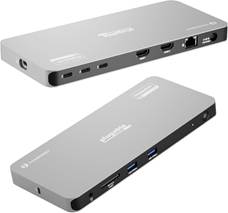
Recommended Docks That Actually Work
(Verified for real-world use — not marketing claims)
🔹 Best USB-C Dock for One or Two Monitors
🔹 Best Thunderbolt Dock for Multiple Monitors
🔹 Best Budget-Friendly Reliable Option
Final Takeaway
Cheap USB-C hubs fail because they’re built for price, not performance.
If a hub:
- Hides specs
- Avoids DisplayPort Alt Mode
- Overpromises monitor support
- Costs half of trusted brands
…it’s usually not worth the frustration.
Buying the right dock once is cheaper than returning three bad ones.
Affiliate Disclosure
Some links on this site may be affiliate links. If you make a purchase through these links, PrimePeripheral.com may earn a commission at no additional cost to you. This helps support continued testing, research, and content creation.