If your Wi-Fi drops in certain rooms, the first thing most people buy is a Wi-Fi extender.
It seems logical:
“My signal is weak over there, so I’ll extend it.”
But after installing one, many people notice something frustrating:
- Speeds get slower
- Connections feel unstable
- Streaming buffers more
- Video calls drop
So what happened?
This article explains why Wi-Fi extenders often make internet performance worse, and what actually fixes the problem instead.
The Core Problem Most People Don’t Realize
Wi-Fi extenders don’t create new internet speed.
They repeat an already weak signal.
That means:
- A bad signal gets rebroadcast
- Latency increases
- Bandwidth is split
- Devices jump between networks
The extender isn’t broken — it’s doing exactly what it’s designed to do.
The design itself is the limitation.
Why Wi-Fi Extenders Cause Problems
1. They Cut Your Speed Automatically
Most extenders use the same radio to:
- Receive the signal
- Re-broadcast it
This often results in:
- 50% speed loss
- Increased lag
- Slower uploads
The farther the extender is from the router, the worse this gets.
2. Devices Don’t Switch Networks Cleanly
Extenders create a separate network.
Even when named the same:
- Phones hang onto weak signals
- Laptops don’t roam properly
- Connections stall during handoffs
This causes:
- Dropped video calls
- Lag spikes
- Random disconnects
3. Extenders Increase Interference
Each extender:
- Adds radio noise
- Competes for airtime
- Crowds the wireless environment
In apartments or neighborhoods, this can make everything slower — not faster.
4. Placement Is Almost Always Wrong
For an extender to work, it must be placed:
- Close enough to the router to get a strong signal
- Far enough to reach the dead zone
Most homes don’t have a perfect middle spot.
Too close = useless
Too far = slow
What Actually Fixes Wi-Fi Dead Zones
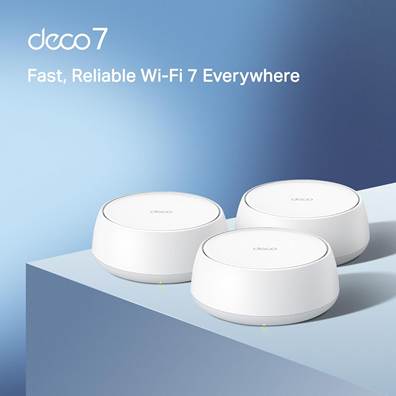
This is where mesh Wi-Fi systems come in.
Mesh systems are designed differently.
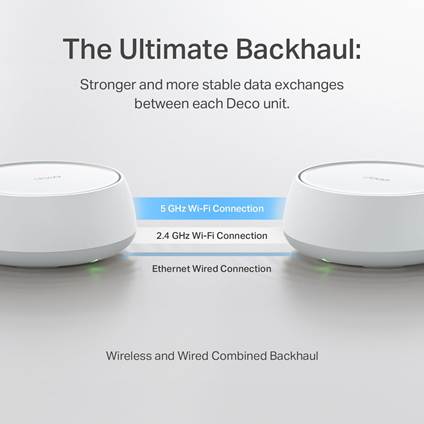
Instead of repeating a weak signal, they:
- Create one unified network
- Use dedicated backhaul communication
- Allow seamless roaming between nodes
To your devices, it looks like one strong Wi-Fi network everywhere.
Why Mesh Wi-Fi Works Better
1. One Network, Not Multiple
Your phone, TV, or laptop:
- Stays connected while moving
- Switches nodes automatically
- Doesn’t “hang” on weak signals
No manual reconnecting.
2. Better Use of Bandwidth
Mesh systems:
- Manage traffic intelligently
- Avoid unnecessary rebroadcasting
- Reduce congestion
This results in:
- More stable speeds
- Lower latency
- Better performance for streaming and gaming
3. Designed for Modern Homes
Mesh systems are built for:
- Larger homes
- Multiple floors
- Dozens of connected devices
Extenders were designed for a much simpler era of Wi-Fi.
When a Wi-Fi Extender Might Be Okay
To be fair, extenders aren’t always useless.
They can work if:
- You only need coverage in one small area
- Internet speed demands are low
- The extender is placed perfectly
But for most people experiencing real frustration, they’re a temporary band-aid.
Who Mesh Wi-Fi Is Best For
Mesh Wi-Fi systems are worth considering if you:
- Have dead zones in multiple rooms
- Work from home
- Stream or game frequently
- Have smart devices throughout the house
- Are tired of tweaking settings constantly
They cost more — but they solve the root problem.
What to Look for Before Buying a Mesh System
Before choosing a mesh system, pay attention to:
- Home size coverage ratings
- Wired vs wireless backhaul support
- Number of nodes included
- App control and update support
👉 Recommended mesh Wi-Fi systems worth considering
👉 Best value option for most homes
Final Takeaway
Wi-Fi extenders don’t usually fail because they’re defective.
They fail because they’re the wrong tool for most homes.
If your internet feels unstable, slow, or inconsistent:
- Adding extenders often compounds the problem
- Mesh systems address the underlying issue
Fixing Wi-Fi isn’t about stretching a weak signal —
it’s about building a better network.
Affiliate Disclosure
Some links on this site may be affiliate links. If you make a purchase through these links, PrimePeripheral.com may earn a commission at no additional cost to you. This helps support continued testing, research, and content creation.